Deep dive into Events and Workflows
มาดูรายละเอียดเชิงลึกของ Events และ Workflows กัน
- series
- GitHub Actions Workshop
- episode
- ตอนที่ 11 จาก 26
- read
- อ่าน 6 นาที
เอามาให้ดูซ้ำอีกที
จะแบ่งคร่าวๆได้สองกลุ่ม
- Repository Related Events
- Other Events
graph TB
    subgraph Main["GitHub Events System"]
    direction LR
      subgraph Repo["Repository Related Events"]
          A[push] --> |triggers| Action1[GitHub Action]
          B[pull_request] --> |triggers| Action1
          D[create] --> |triggers| Action1
          F[fork] --> |triggers| Action1
          G[release] --> |triggers| Action1
          H["watch (starred)"] --> |triggers| Action1
          I[issues] --> |triggers| Action1
          O[More] --> |triggers| Action1
      end
    end

    classDef repoEvents fill:#89b4fa,stroke:#01579b,stroke-width:2px
    classDef actionBox fill:#fab387,stroke:#e65100,stroke-width:3px
    classDef repo fill:#cdd6f4,color:#ffffff

    class A,B,C,D,E,F,G,H,I,J,K,L,M,N,O repoEvents
    class Action1,Action2 actionBox
    class Repo repo
graph LR
    subgraph "Other Events"
        P["schedule (cron)"] --> |triggers| Action2[GitHub Action]
        Q[workflow_dispatch] --> |triggers| Action2
        R["repository_dispatch (REST API triggers)"] --> |triggers| Action2
        S["workflow_call (call by other workflows)"] --> |triggers| Action2
        AA[More] --> |triggers| Action2
    end

    classDef mainBg fill:#ffffff,stroke:#cdd6f4,color:#cdd6f4
    classDef otherEvents fill:#f5c2e7,stroke:#4a148c,stroke-width:2px
    classDef actionBox fill:#fab387,stroke:#e65100,stroke-width:3px

    class P,Q,R,S,T,U,V,W,X,Y,Z,AA otherEvents
    class Action1,Action2 actionBox
    class Main mainBg
Github Actions Event Activity Types
graph TD
    subgraph Main["GitHub Events System"]
        direction LR

        subgraph Events["📋 Events"]
            direction LR
            A[push]
            B[pull_request]
            C[issues]
            D[release]
        end

        subgraph PushEvent["🔄 Push Event"]
            direction LR
            P1[No Activity Types]
            P2[Filters:]
            P3[• branches<br/>• tags<br/>• paths]
            P2 --> P3
        end

        subgraph PREvent["🔀 Pull Request Event"]
            direction LR
            PR1[Activity Types:]
            PR2[• opened<br/>• closed<br/>• synchronize<br/>• reopened]
            PR3[Filters:]
            PR4[• branches<br/>• paths<br/>• types]
            PR1 --> PR2
            PR3 --> PR4
        end

        subgraph IssueEvent["🐛 Issues Event"]
            direction LR
            I1[Activity Types:]
            I2[• opened<br/>• closed<br/>• edited<br/>• labeled]
            I3[Filters:]
            I4[• types<br/>• labels]
            I1 --> I2
            I3 --> I4
        end

        subgraph ReleaseEvent["🚀 Release Event"]
            direction LR
            R1[Activity Types:]
            R2[• published<br/>• created<br/>• edited<br/>• deleted]
            R3[Filters:]
            R4[• types<br/>• tags]
            R1 --> R2
            R3 --> R4
        end
    end

    A --> PushEvent
    B --> PREvent
    C --> IssueEvent
    D --> ReleaseEvent

    %% Catppuccin Mocha Colors
    classDef mainBg fill:#ffffff,stroke:#cdd6f4,color:#cdd6f4
    classDef eventBox fill:#89b4fa,stroke:#89b4fa,color:#cdd6f4
    classDef pushBox fill:#cba6f7,stroke:#f9e2af,color:#f9e2af
    classDef prBox fill:#a6e3a1,stroke:#a6e3a1,color:#a6e3a1
    classDef issueBox fill:#fab387,stroke:#f38ba8,color:#f38ba8
    classDef releaseBox fill:#f5e0dc,stroke:#cba6f7,color:#cba6f7
    classDef content fill:#ffffff,stroke:#6c7086,color:#cdd6f4

    class Main mainBg
    class Events eventBox
    class A,B,C,D content
    class PushEvent pushBox
    class PREvent prBox
    class IssueEvent issueBox
    class ReleaseEvent releaseBox
    class P1,P2,P3,PR1,PR2,PR3,PR4,I1,I2,I3,I4,R1,R2,R3,R4 content
ตัวอย่างจากใน Github actions document
ไปดูได้ที่ link นี้ แต่ก็จะแคปมาให้ดูด้วยแบบนี้
มาดู event push กันก่อน
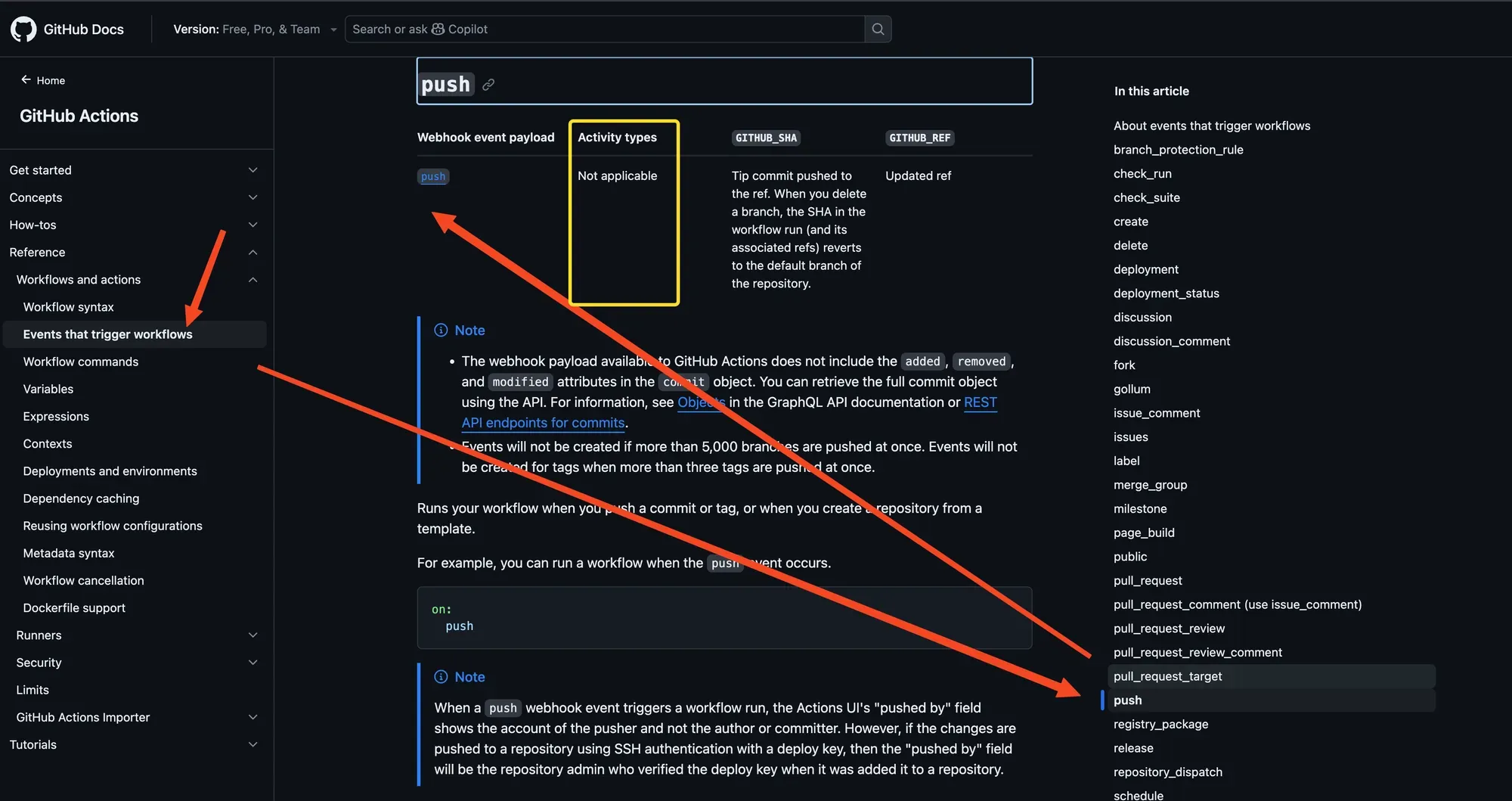
จะเห็นว่า push ไม่มี activity types เลย
มาลองดู pull_request ดูบ้าง
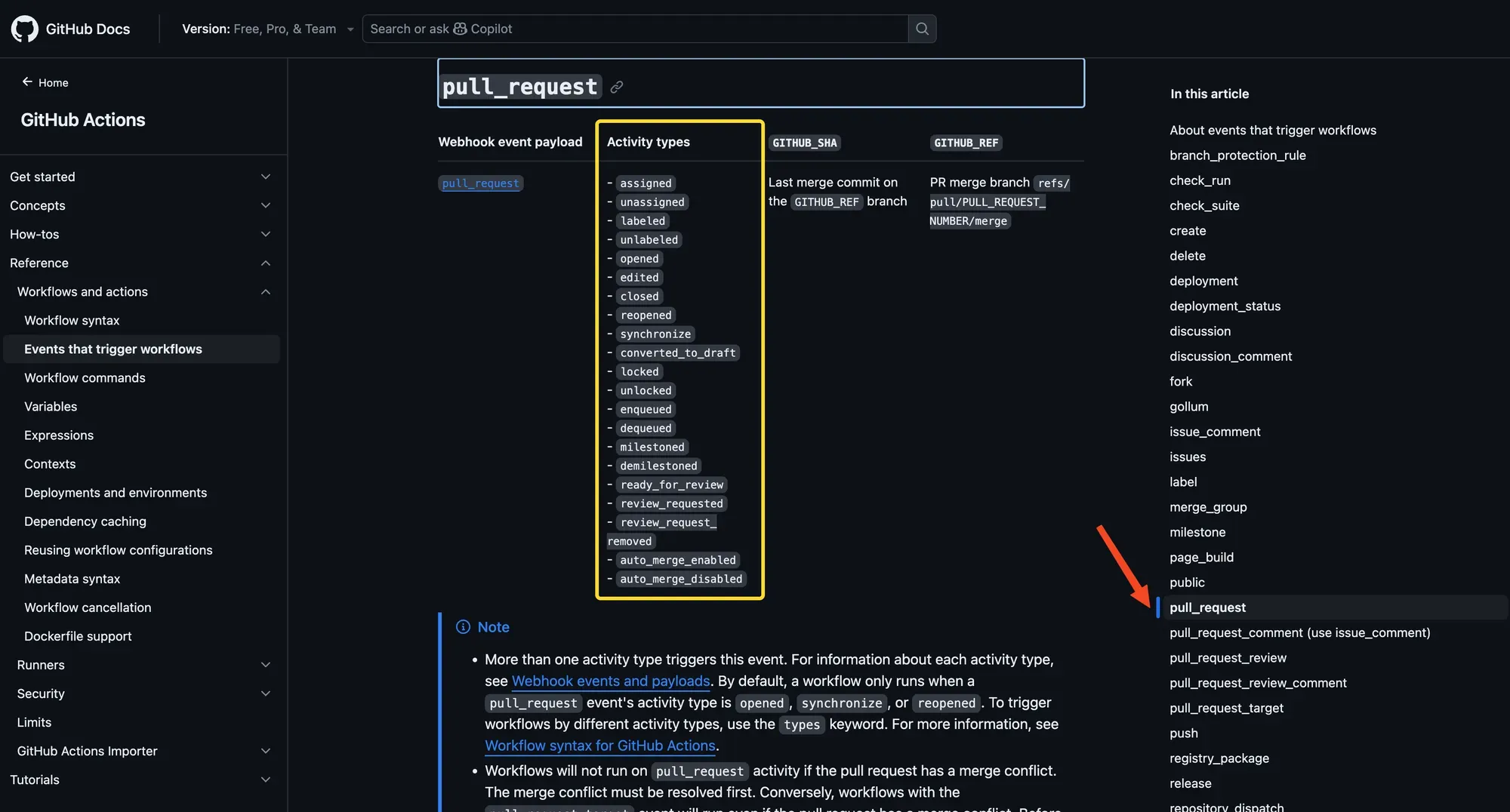
จะเห็นว่ามี activity types เยอะมาก
พอเลื่อนลงมาอีกนิดจะมี Note อยู่
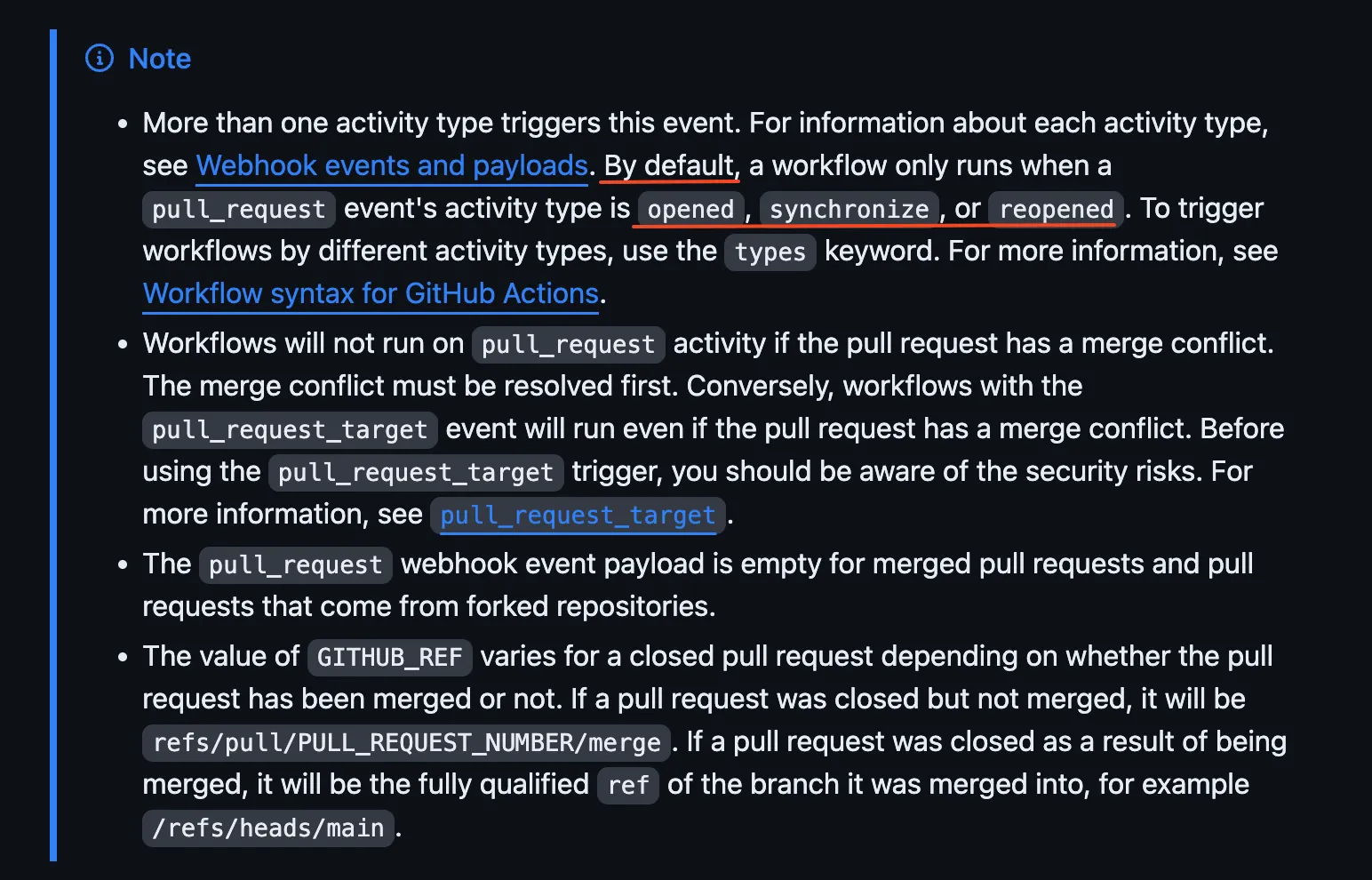
จะเห็นว่ามี default เป็น opened, synchronize, reopened
ที่ให้ดูเป็นแค่ตัวอย่างเฉยๆ ยังมี Events อีกเยอะมากๆ คงจะเอามาให้ดูทั้งหมดไม่ได้ ลองไปตามดูใน Docs อีกทีนะครับ
มาลองใช้งาน Activity types ใน workflow จริงๆกัน
โดยเราจะใช้ event pull_request นะ
ยังอยู่กับ project เดิมของเรา
เราจะแก้ lint workflow นะ
workflows/lint.yaml
name: ESLinton: pull_request: types: - openedjobs: lint: runs-on: ubuntu-latest steps: - name: Get Code uses: actions/checkout@v4 - name: Install Bun uses: oven-sh/setup-bun@v2 with: bun-version: 1.2.8 - name: Install Dependencies run: bun i - name: Run ESLint run: bun run lintลอง push code ดูก่อน จะเห็นว่า workflow lint ไม่ทำงาน
นั่นก็เพราะว่าเราใส่แค่ on: pull_request อันเดียว
ถ้าจะให้ทำงานหลังจาก push code ก็ต้องใส่ on: push ด้วยสิ
แต่รอบนี้เราใช้ pull_request ใช่มะ ก็จะมาทำต่อเพื่อให้เปิด pull request ใหม่ได้
เราแยก branch ออกมา แล้วแก้อะไรก็ได้ ในที่นี้ขอแก้ไฟล์สำหรับหน้า home ละกัน
git switch -c homeแก้หน้า Home ต่อเลย
src/App.tsx
import { useState } from "react";import reactLogo from "./assets/react.svg";import viteLogo from "/vite.svg";import "./App.css";
function App() { const [count, setCount] = useState(0);
return ( <> <div> <a href="https://vite.dev" target="_blank"> <img src={viteLogo} className="logo" alt="Vite logo" /> </a> <a href="https://react.dev" target="_blank"> <img src={reactLogo} className="logo react" alt="React logo" /> </a> </div> <h1>Vite + React</h1> <div className="card"> <button onClick={() => setCount((count) => count + 1)}> count is {count} </button> <p> Edit <code>src/App.tsx</code> and save to test HMR </p> </div> <p className="read-the-docs">Hello Github Actions</p> </> );}
export default App;แล้วก็ commit แล้ว push code ได้เลย
git add .git commit -m "Update App.tsx"git push origin homeเสร็จแล้วมาสร้าง pull request ที่หน้าเวปกัน
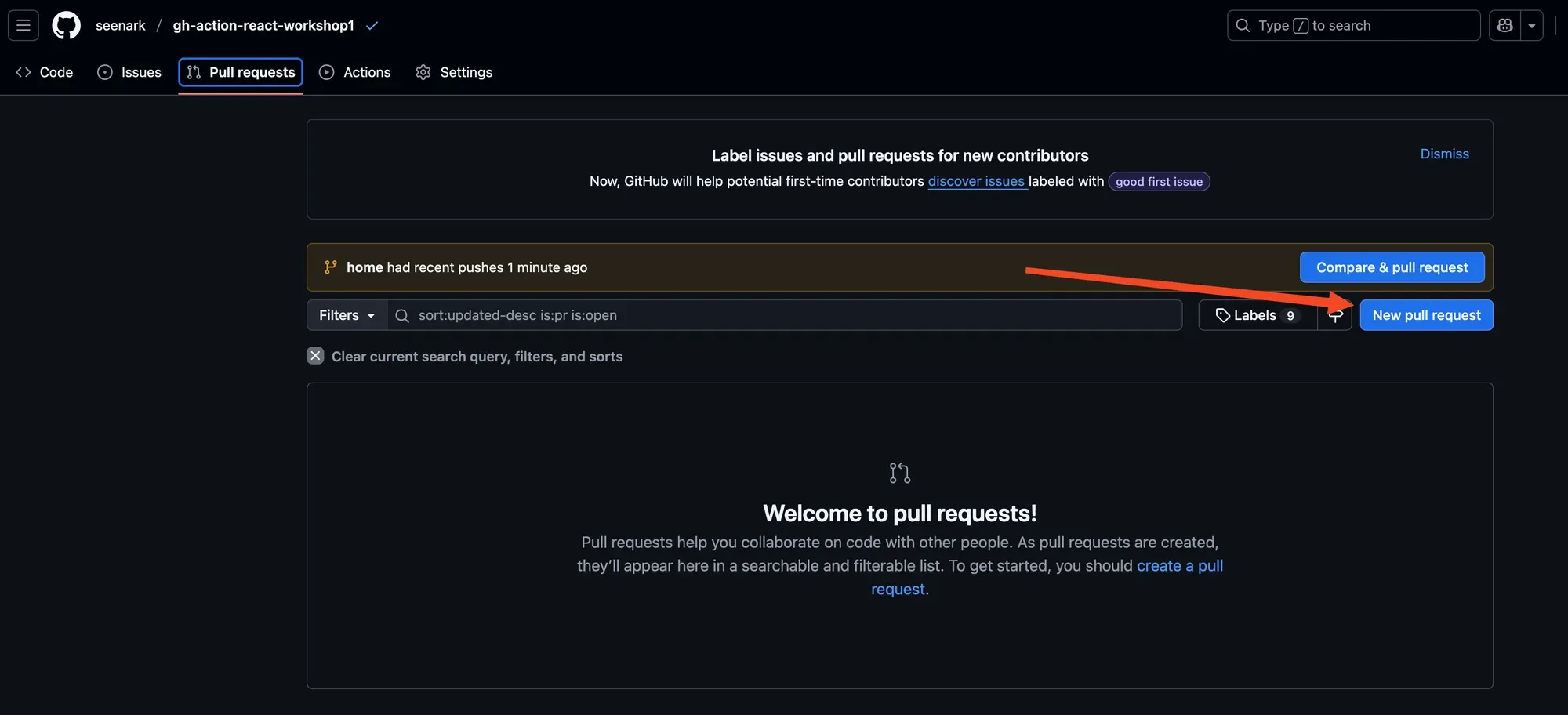
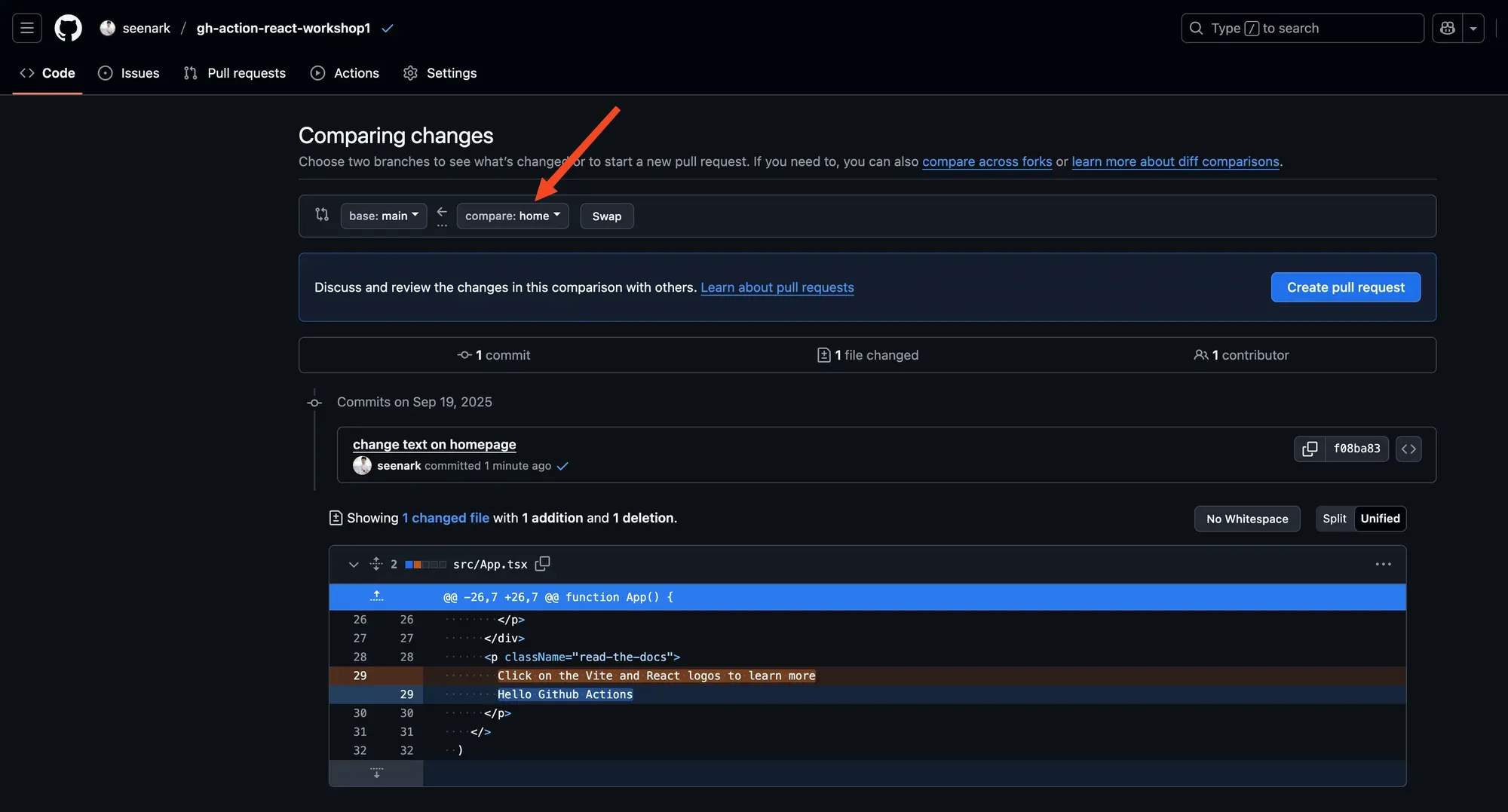
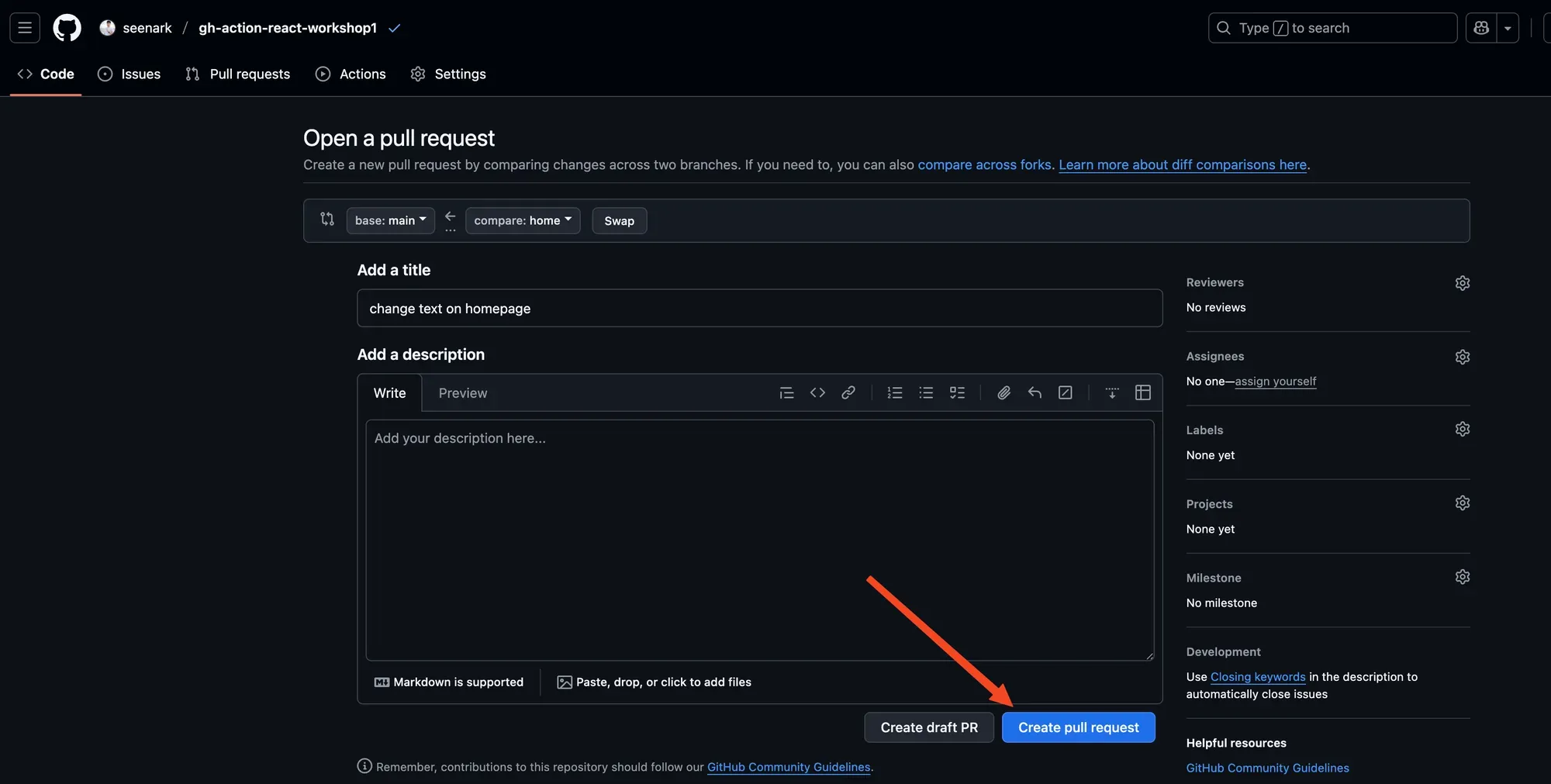
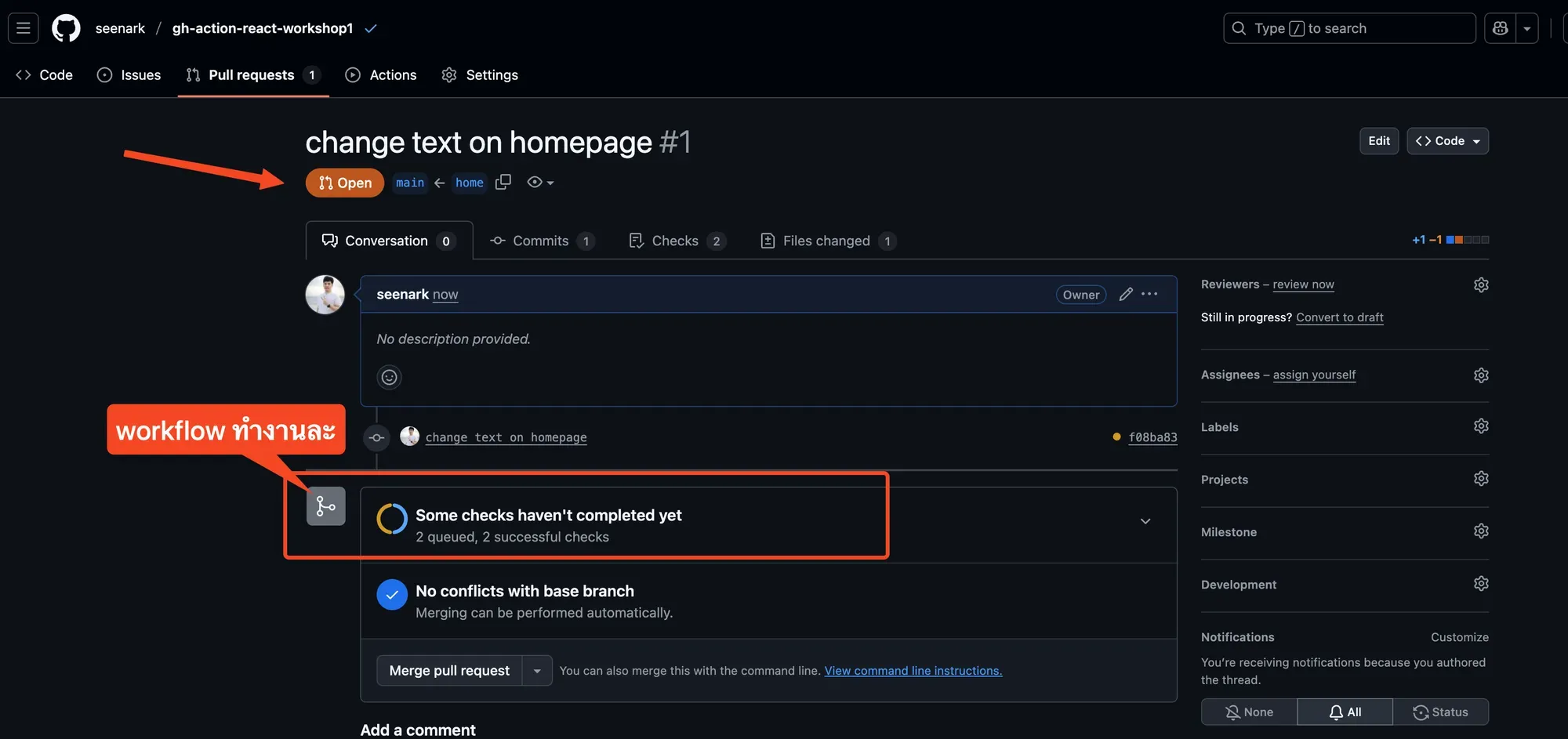
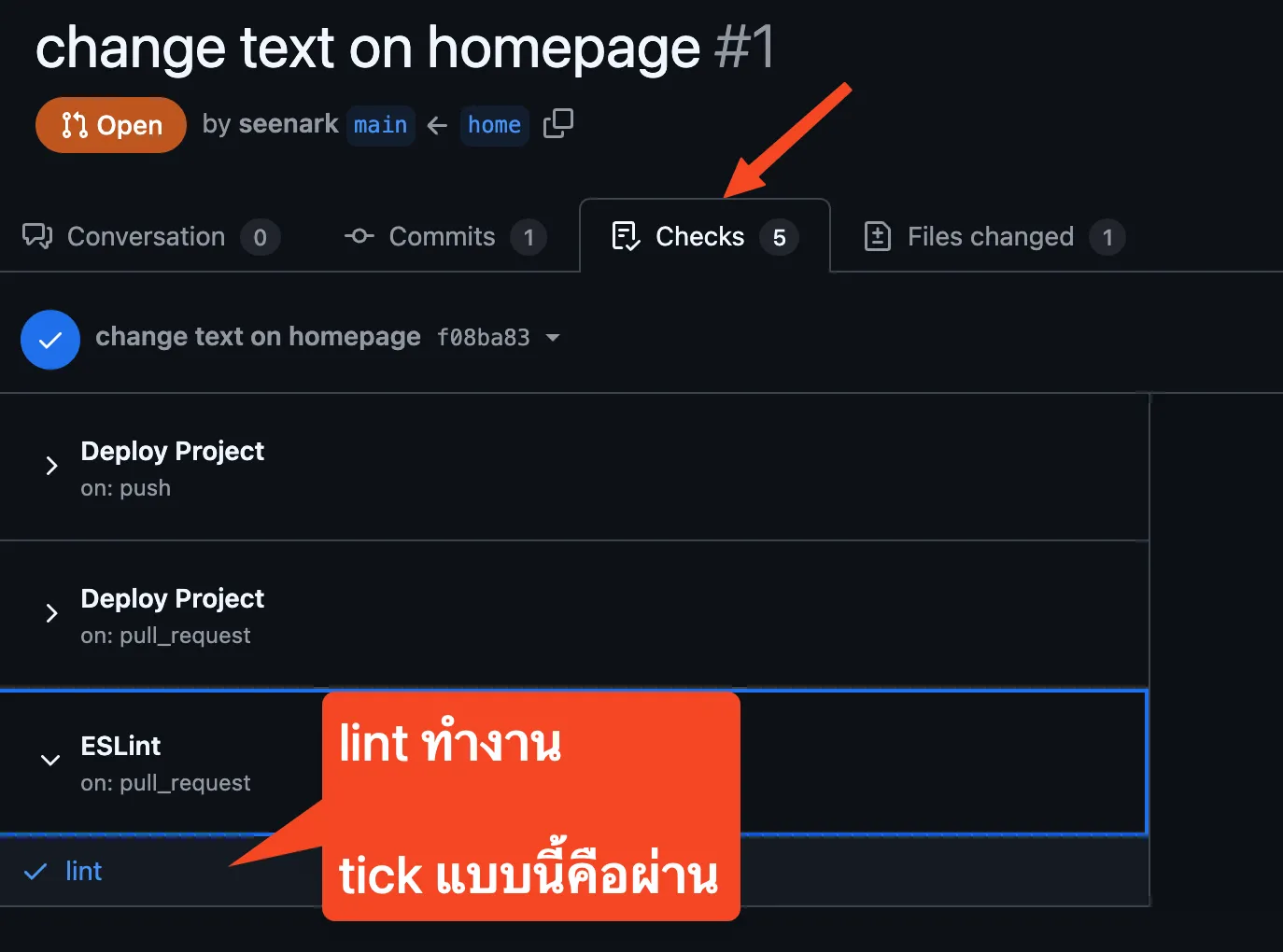
พอ workflow ทำงานเสร็จ จะได้แบบนี้
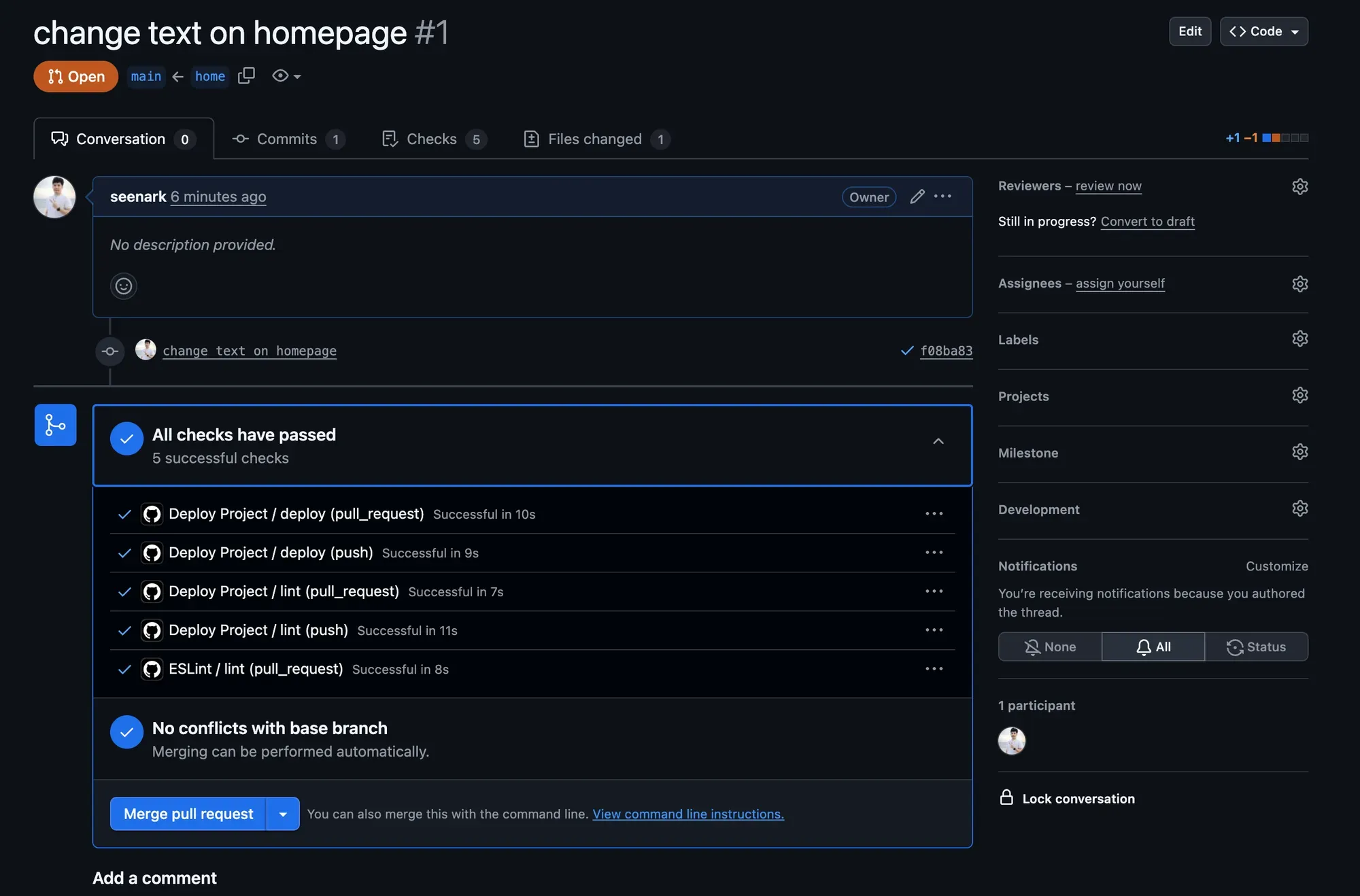
ที่ tab Checks ก็จะมีข้อมูลบอกเหมือนกัน
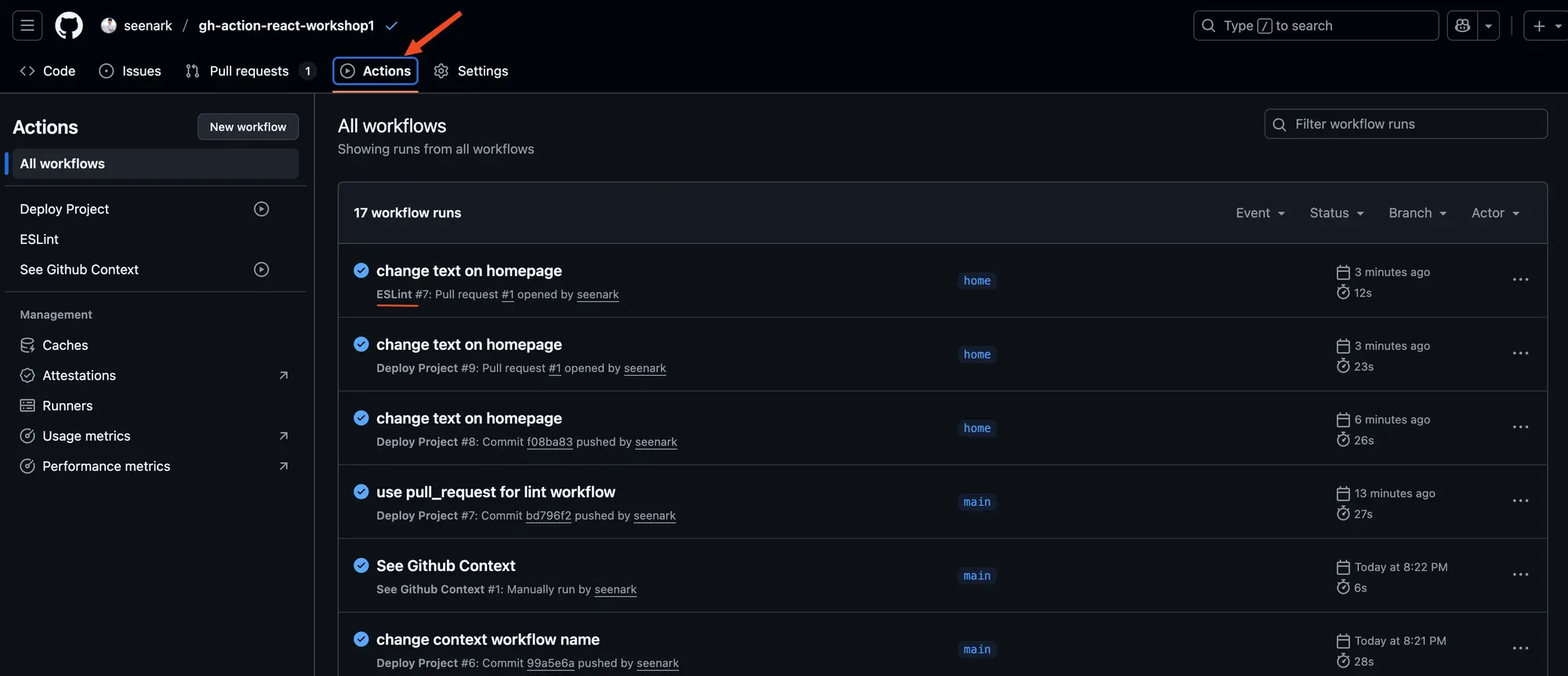
ลองดูอีกครั้งที่ tab Actions
Github Actions Event Filters
GitHub Actions Event Filter คือการกำหนดเงื่อนไขให้ workflow ทำงานเฉพาะเมื่อเหตุการณ์ที่เกิดขึ้นตรงตามเงื่อนไขที่กำหนด
ตัวอย่างเช่น
on: push: branches: [main, develop] # ทำงานเฉพาะเมื่อ push ไป branch main หรือ develop paths: ["src/**"] # ทำงานเฉพาะเมื่อมีการเปลี่ยนแปลงใน folder src
pull_request: branches: [main] # ทำงานเฉพาะเมื่อสร้าง PR ไป main branchFilter ที่ใช้บ่อย:
- branches - กรองตาม branch
- paths - กรองตามไฟล์/โฟลเดอร์ที่เปลี่ยนแปลง
- tags - กรองตาม tag
- types - กรองตามประเภทของ event (ที่ทำไปด้านบนไง)
ตัวอย่าง 1 push event
on: push: branches: - main - develop - "release/**" # release/v1.0, release/v2.0 - "hotfix/*" # hotfix/bug-123 - "!feature/**" # ยกเว้น feature branches
paths: - "src/**" # รวมทุกไฟล์ใน src - "api/**/*.js" # เฉพาะไฟล์ .js ใน api - "package*.json" # package.json, package-lock.json - "!**/*.md" # ยกเว้นไฟล์ markdown - "!docs/**" # ยกเว้น docs folder
tags: - "v*" # v1.0.0, v2.1.3 - "!v*-beta" # ยกเว้น beta tagsตัวอย่าง 2 pull_request event
on: pull_request: types: - opened # เมื่อสร้าง PR ใหม่ - synchronize # เมื่อ push commit ใหม่ใน PR - reopened # เมื่อเปิด PR ที่ปิดไว้ - ready_for_review # เมื่อเปลี่ยนจาก draft เป็น ready
branches: - main - develop - "release/**"
paths: - "src/**" - "tests/**" - ".github/workflows/**" # เมื่อแก้ workflow - "!**/*.md" - "!assets/**"