Job Artifacts
เราจะเอา files & folders ที่ได้จากการ build ไปใช้ต่อใน Jobs อื่นๆยังไงดี
- series
- GitHub Actions Workshop
- episode
- ตอนที่ 13 จาก 26
- read
- อ่าน 4 นาที
GitHub Job Artifact คืออะไร
Artifact คือไฟล์หรือโฟลเดอร์ที่เกิดขึ้นจากการรัน GitHub Actions workflow ที่เราต้องการเก็บไว้ใช้งานต่อ เช่น ไฟล์ที่ build เสร็จแล้ว, dist folder จากการ build react csr, testing report, หรือ log files
ตัวอย่างการใช้งาน
เราจะใช้ action actions/upload-artifact@v4 ช่วยทำงานส่วนนี้
ยกตัวอย่างเช่น เรา build React csr จาก Vite จะได้ folder dist มาใช่มะ เราก็จะต้องเอา folder dist upload ไปเก็บไว้ที่ Artifacts Storage ก่อน
ถ้า Jobs อื่นอยากใช้งานก็ให้ใช้ action actions/download-artifact@v4 เพื่อ download มาใช้งาน
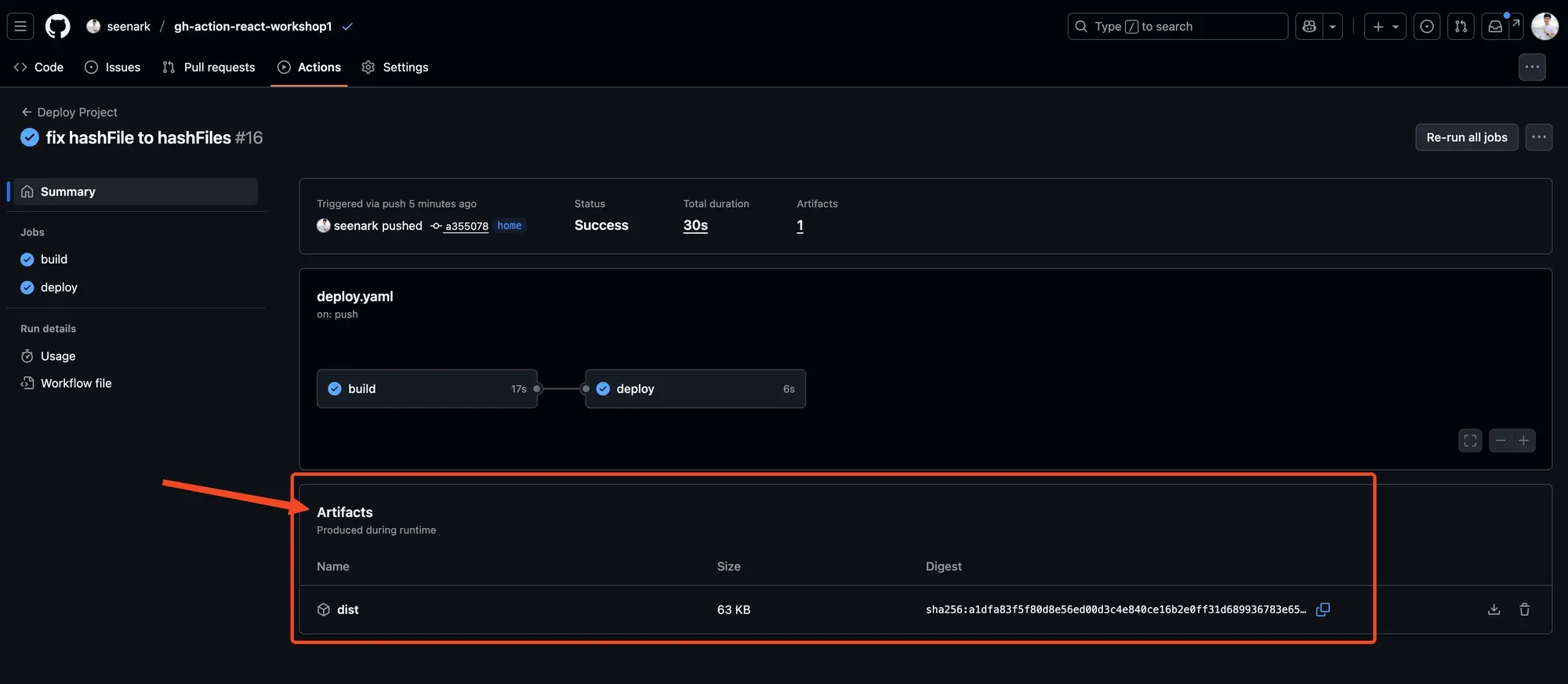
Artifacts Storage เป็นเหมือนพื้นที่ตรงกลางที่เก็บไฟล์ให้เราอะนะ
flowchart TD
    subgraph "React Vite Pipeline"
        direction TB

        subgraph "Job 1: Test"
            A[🧪 Run Tests] --> B[📊 Generate Coverage]
            B --> C[📤 Upload test-results.zip]
        end

        subgraph "Job 2: Build"
            D[🏗️ npm run build] --> E[📦 Create dist/ folder]
            E --> F[📤 Upload vite-build.zip]
        end

        subgraph "Artifacts Storage"
            G[(📁 GitHub Storage)]
            H[test-results.zip]
            I[vite-build.zip]
        end

        subgraph "Job 3: Deploy"
            J[📥 Download vite-build.zip] --> K[🚀 Deploy to Vercel]
            K --> L[✅ Deployment Success]
        end
    end

    %% Connections
    C --> G
    F --> G
    G --> H
    G --> I
    I --> J

    %% Catppuccin Mocha Colors
    classDef testJob fill:#f38ba8,stroke:#eba0ac,stroke-width:2px,color:#11111b
    classDef buildJob fill:#89b4fa,stroke:#74c7ec,stroke-width:2px,color:#11111b
    classDef deployJob fill:#a6e3a1,stroke:#94e2d5,stroke-width:2px,color:#11111b
    classDef storage fill:#cba6f7,stroke:#b4befe,stroke-width:2px,color:#11111b
    classDef artifacts fill:#f9e2af,stroke:#fab387,stroke-width:2px,color:#11111b

    %% Apply Classes
    class A,B,C testJob
    class D,E,F buildJob
    class J,K,L deployJob
    class G storage
    class H,I artifacts
ที่ต้องทำแบบนี้ก็เพราะว่าแต่ละ Jobs มันทำงานอยู่กันคนละที่เลย
- เก็บไฟล์ Build
- name: Build app run: npm run build
- name: Upload build files uses: actions/upload-artifact@v3 with: name: build-files path: dist/- เก็บ Test report
- name: Run tests run: npm test
- name: Upload test report uses: actions/upload-artifact@v3 with: name: test-report path: coverage/- ใช้ Artifact ใน Job อื่น
job2:needs: job1steps: - name: Download build files uses: actions/download-artifact@v3 with: - name: build-files path: ./buildArtifact จะถูกเก็บไว้ 90 วัน (default) และสามารถดาวน์โหลดได้จากหน้า Actions ของ repository
Hands-on
มาลงมือทำกัน
ยังอยู่ที่โปรเจคเดิม
เราสั่ง build จะได้แบบนี้
bun run build$ tsc -b && vite buildvite v7.1.5 building for production...✓ 32 modules transformed.dist/index.html 0.46 kB │ gzip: 0.30 kBdist/assets/react-CHdo91hT.svg 4.13 kB │ gzip: 2.05 kBdist/assets/index-D8b4DHJx.css 1.39 kB │ gzip: 0.71 kBdist/assets/index-hT4HLifg.js 188.03 kB │ gzip: 59.20 kB✓ built in 458msเราจะได้ folder dist มา
Flow ที่เราจะทำคือ มี 2 jobs
- Build job
- Deploy job
Build job เราจะเอา folder dist upload ไปเก็บที่ Artifact storage
แล้วให้ Deploy job ดาวน์โหลดมาใช้ เพื่อ deploy ต่อไป
workflows/deploy.yaml
name: Deploy Projecton: push: workflow_dispatch: pull_request:jobs: build: runs-on: ubuntu-latest steps: - name: Get Code uses: actions/checkout@v4 - name: Install Bun uses: oven-sh/setup-bun@v2 with: bun-version: 1.2.18 - name: Install Dependencies run: bun i - name: Build run: bun run build - name: upload dist folder uses: actions/upload-artifact@v4 with: name: dist-folder path: | dist public
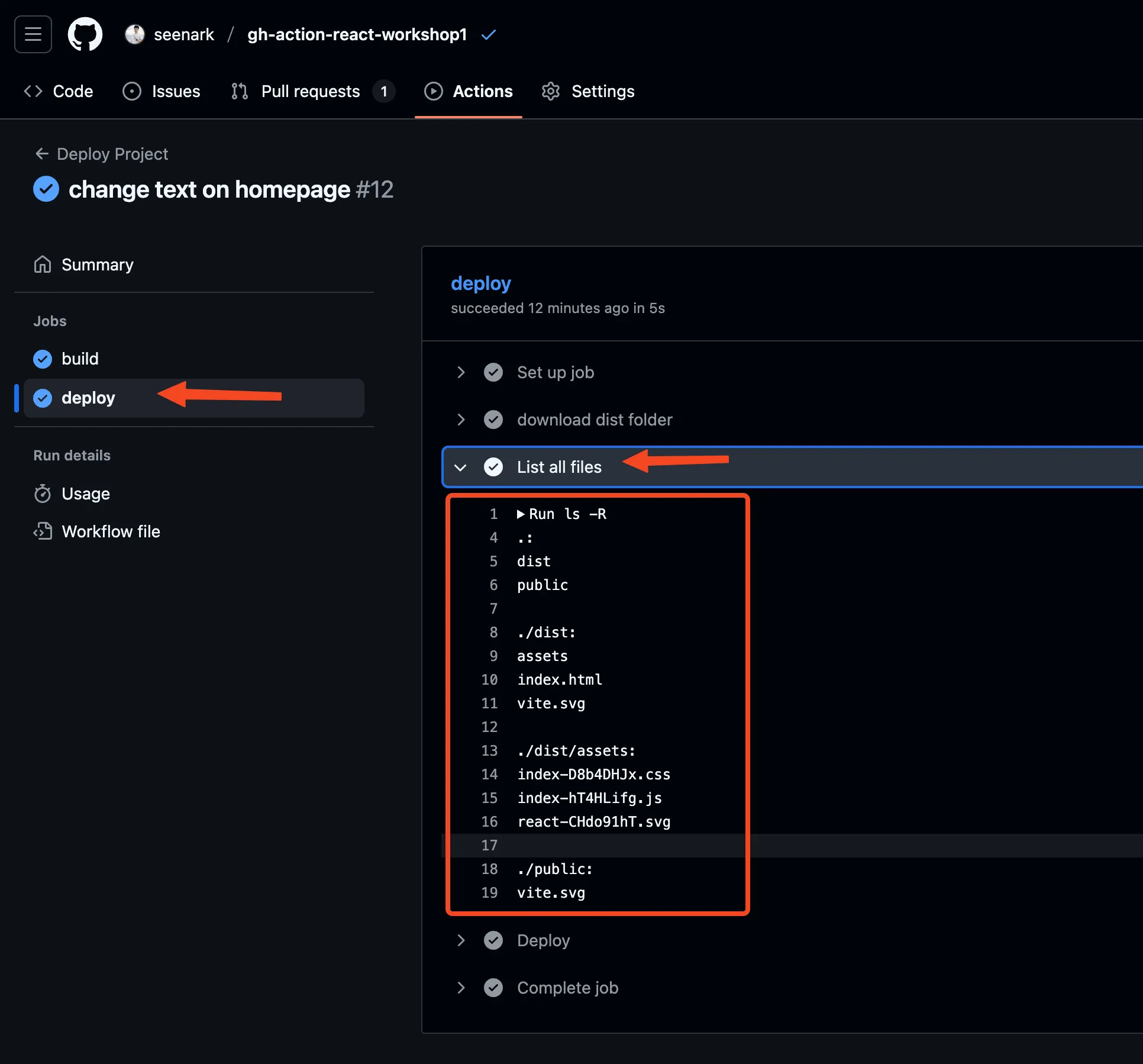
deploy: needs: - build runs-on: ubuntu-latest steps: - name: download dist folder uses: actions/download-artifact@v4 with: name: dist-folder - name: List all files run: ls -R - name: Deploy run: echo "Deploying..."ลองเปิดดูที่หน้าเว็ป