Protect Kong Manager
Put Kong Manager behind Kong itself, on subdomains or on a sub-path.
- series
- Kong Workshop
- episode
- ตอนที่ 19 จาก 20
- read
- อ่าน 5 นาที
Setup services and routes for Kong manager
ให้ใช้ Kong Manager ในการสร้าง service สำหรับ
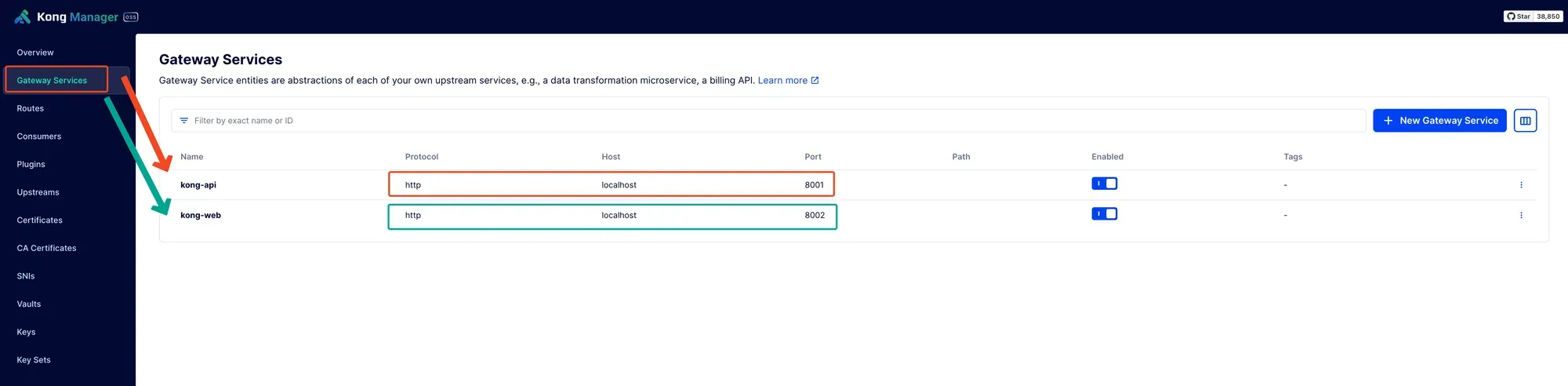
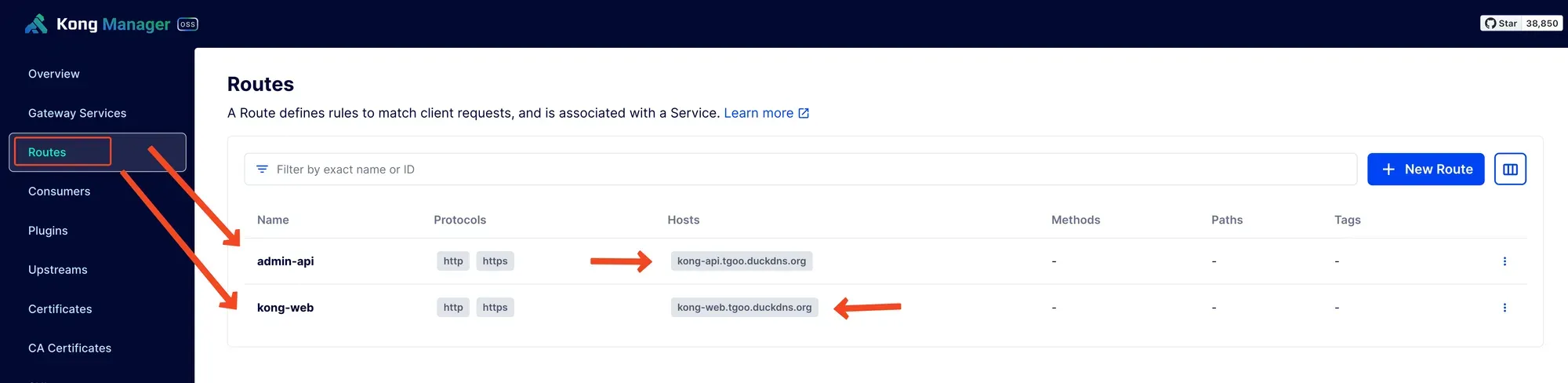
- Kong Manager Web UI โดยชี้ไปที่ 👉 http://localhost:8002
-
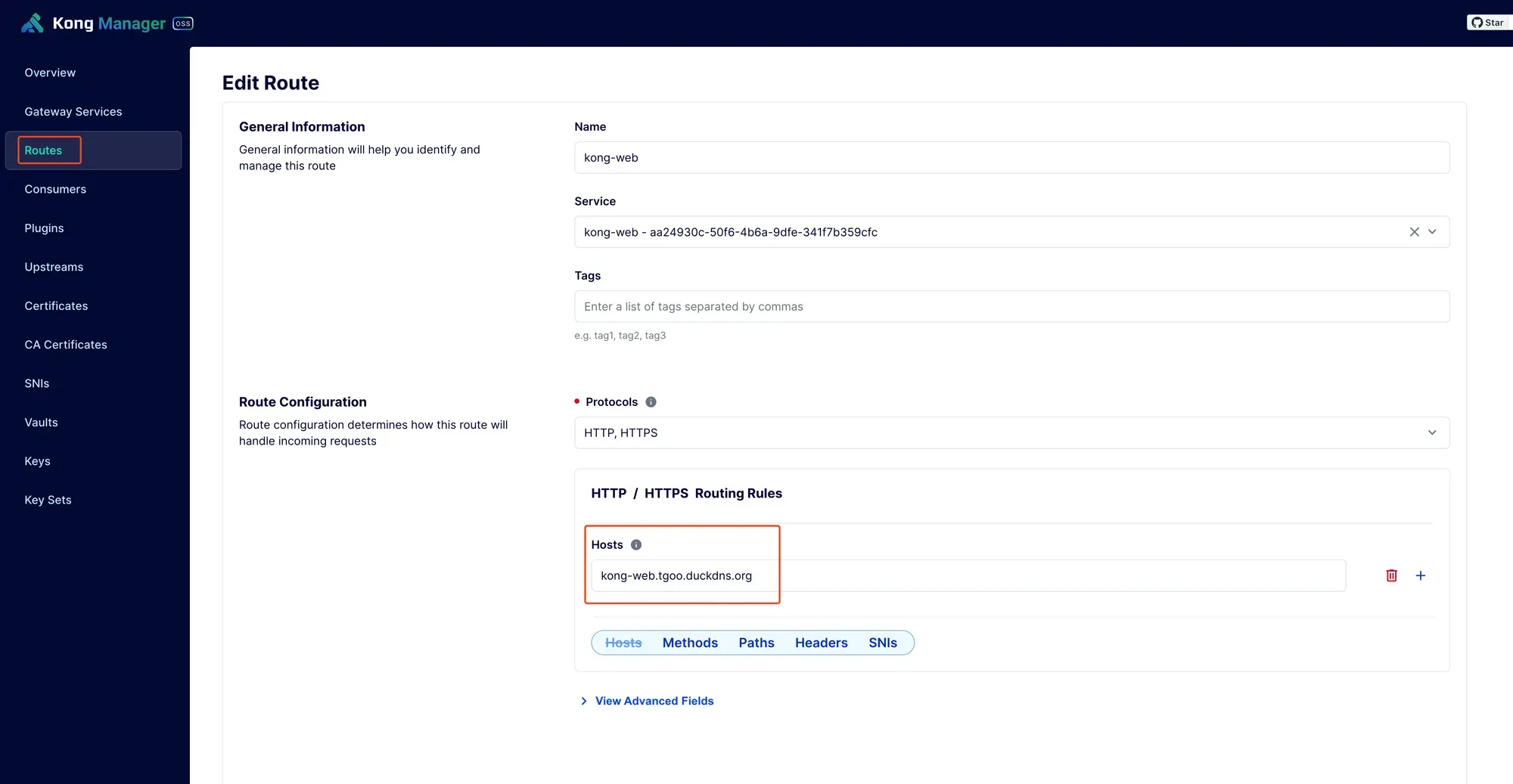
1.1 สร้าง Route สำหรับ web ui โดยตั้ง host ไปที่ domain ที่ชอบ ในที่นี้จะใช้ 👇
- Kong Manager API โดยชี้ไปที่ 👉 http://localhost:8001
- 2.1 สร้าง route สำหรับ Kong api โดยตั้ง host ไปที่ domain ที่ชอบ ในที่นี้จะใช้ 👇
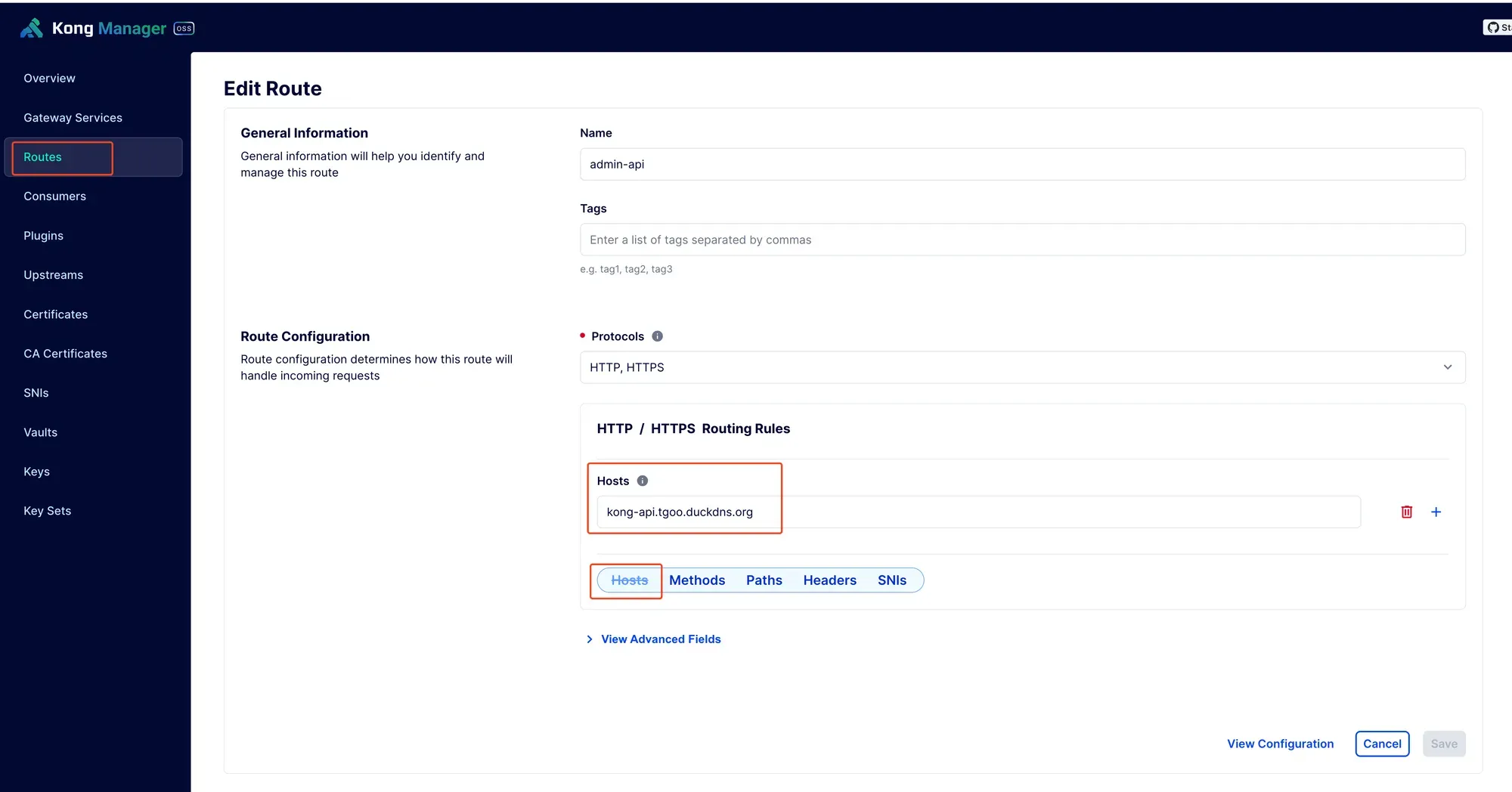
https://kong-api.tgoo.duckdns.org
แล้วเอา domain ทั้งสองไปใส่ใน ENV ใน kong service
KONG_ADMIN_GUI_URL: "https://kong-web.tgoo.duckdns.org"KONG_ADMIN_GUI_API_URL: "https://kong-api.tgoo.duckdns.org"
ตัวอย่าง setup แบบใช้ sub-domain แบบด้านบน
version: "3.9"
x-kong-config: &kong-env  KONG_DATABASE: ${KONG_DATABASE:-off}  KONG_PG_DATABASE: ${KONG_PG_DATABASE:-kong}  KONG_PG_HOST: db  KONG_PG_USER: ${KONG_PG_USER:-kong}  KONG_PG_PASSWORD_FILE: /run/secrets/kong_postgres_password
volumes:  kong_data: {}  kong_prefix_vol:    driver_opts:      type: tmpfs      device: tmpfs  kong_tmp_vol:    driver_opts:      type: tmpfs      device: tmpfs
networks:  kong-net:    external: true
services:  kong-migrations:    image: "${KONG_DOCKER_TAG:-kong:latest}"    command: kong migrations bootstrap    profiles: ["database"]    depends_on:      - db    environment:      <<: *kong-env    secrets:      - kong_postgres_password    networks:      - kong-net    restart: on-failure
  kong-migrations-up:    image: "${KONG_DOCKER_TAG:-kong:latest}"    command: kong migrations up && kong migrations finish    profiles: ["database"]    depends_on:      - db    environment:      <<: *kong-env    secrets:      - kong_postgres_password    networks:      - kong-net    restart: on-failure
  kong:    image: "${KONG_DOCKER_TAG:-kong:latest}"    user: "${KONG_USER:-kong}"    environment:      <<: *kong-env      KONG_ADMIN_ACCESS_LOG: /dev/stdout      KONG_ADMIN_ERROR_LOG: /dev/stderr      KONG_PROXY_LISTEN: "${KONG_PROXY_LISTEN:-0.0.0.0:8000}"      KONG_ADMIN_LISTEN: "${KONG_ADMIN_LISTEN:-0.0.0.0:8001}, 0.0.0.0:8444"      KONG_ADMIN_GUI_LISTEN: "${KONG_ADMIN_GUI_LISTEN:-0.0.0.0:8002}, 0.0.0.0:8445"      KONG_ADMIN_GUI_URL: "https://kong-web.tgoo.duckdns.org"      KONG_ADMIN_GUI_API_URL: "https://kong-api.tgoo.duckdns.org"      KONG_PROXY_ACCESS_LOG: /dev/stdout      KONG_PROXY_ERROR_LOG: /dev/stderr      KONG_PREFIX: ${KONG_PREFIX:-/var/run/kong}      KONG_DECLARATIVE_CONFIG: "/opt/kong/kong.yaml"
    secrets:      - kong_postgres_password    networks:      - kong-net    ports:      # The following two environment variables default to an insecure value (0.0.0.0)      # according to the CIS Security test.      - "${KONG_INBOUND_PROXY_LISTEN:-0.0.0.0}:8000:8000/tcp"      - "${KONG_INBOUND_SSL_PROXY_LISTEN:-0.0.0.0}:8443:8443/tcp"      # Making them mandatory but undefined, like so would be backwards-breaking:      # - "${KONG_INBOUND_PROXY_LISTEN?Missing inbound proxy host}:8000:8000/tcp"      # - "${KONG_INBOUND_SSL_PROXY_LISTEN?Missing inbound proxy ssl host}:8443:8443/tcp"      # Alternative is deactivating check 5.13 in the security bench, if we consider Kong's own config to be enough security here
      - "0.0.0.0:8001:8001/tcp"      - "0.0.0.0:8444:8444/tcp"      - "0.0.0.0:8002:8002/tcp"      - "0.0.0.0:8445:8445/tcp"    healthcheck:      test: ["CMD", "kong", "health"]      interval: 10s      timeout: 10s      retries: 10    restart: on-failure:5    read_only: true    volumes:      - kong_prefix_vol:${KONG_PREFIX:-/var/run/kong}      - kong_tmp_vol:/tmp      - ./config:/opt/kong    security_opt:      - no-new-privileges
  db:    image: postgres:9.5    profiles: ["database"]    environment:      POSTGRES_DB: ${KONG_PG_DATABASE:-kong}      POSTGRES_USER: ${KONG_PG_USER:-kong}      POSTGRES_PASSWORD_FILE: /run/secrets/kong_postgres_password    secrets:      - kong_postgres_password    healthcheck:      test:        [          "CMD",          "pg_isready",          "-d",          "${KONG_PG_DATABASE:-kong}",          "-U",          "${KONG_PG_USER:-kong}",        ]      interval: 30s      timeout: 30s      retries: 3    restart: on-failure    stdin_open: true    tty: true    networks:      - kong-net    volumes:      - kong_data:/var/lib/postgresql/data
secrets:  kong_postgres_password:    file: ./POSTGRES_PASSWORD
เสร็จแล้ว restart kong container ด้วยนะ
ทีนี้เราก็กลับมา setup authen ต่างๆที่ route https://kong-web.tgoo.duckdns.org ตามชอบได้เลย
ตัวอย่าง setup kong manager ui โดยใช้ sub-path
ในตัวอย่างนี้เราจะใช้ url แบบนี้
- Web UI: https://backend-tgo.dev-env-th.com/kong-manager-ui
- Kong API: https://backend-tgo.dev-env-th.com/kong-manager-api
path ไม่เหมือนกันนะ
เราต้องใช้ kong manager ui แบบเดิมในการ setup ก่อนนะ ไม่งั้นมันจะเรียก api ไม่เจอ
Setup Kong API
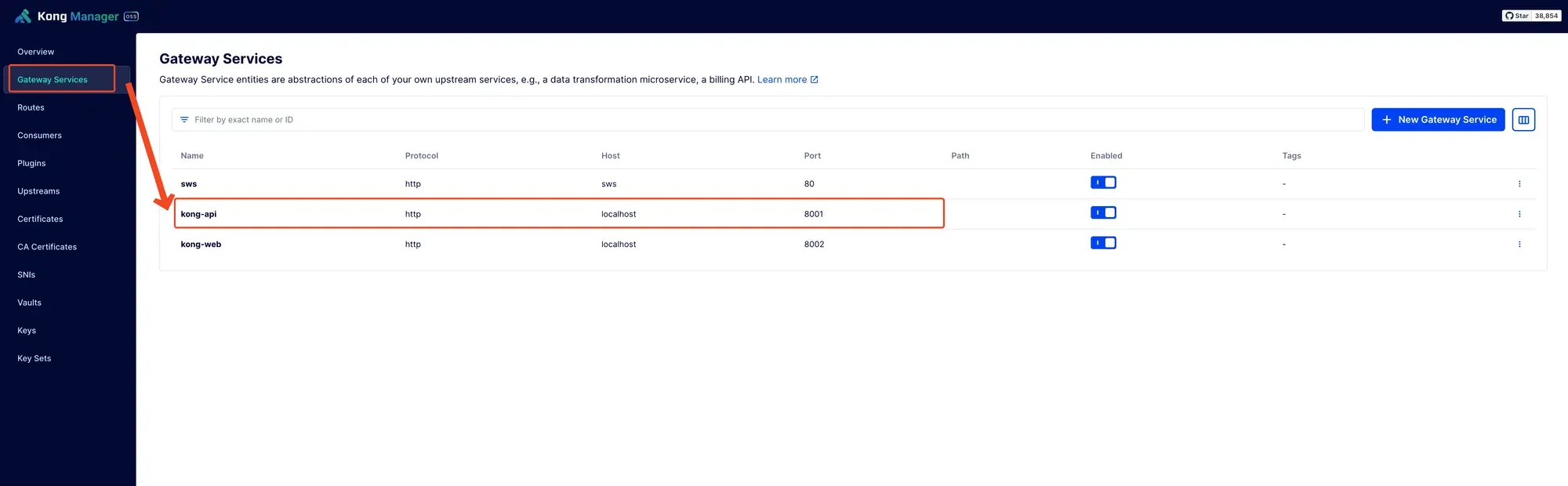
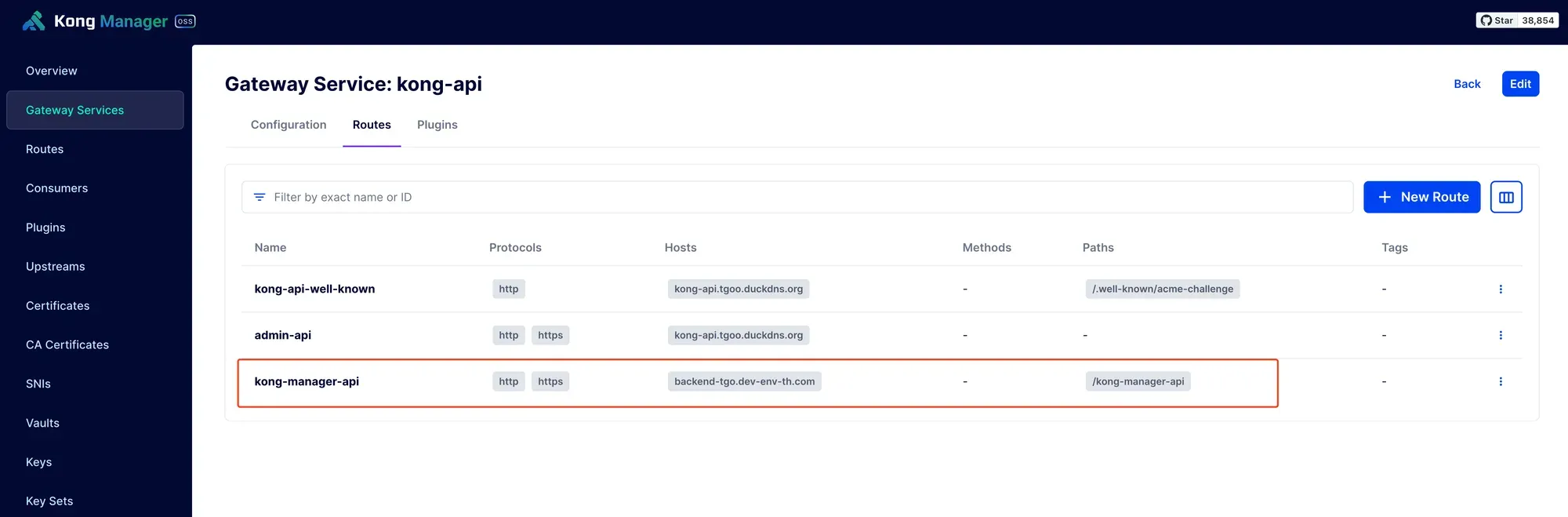
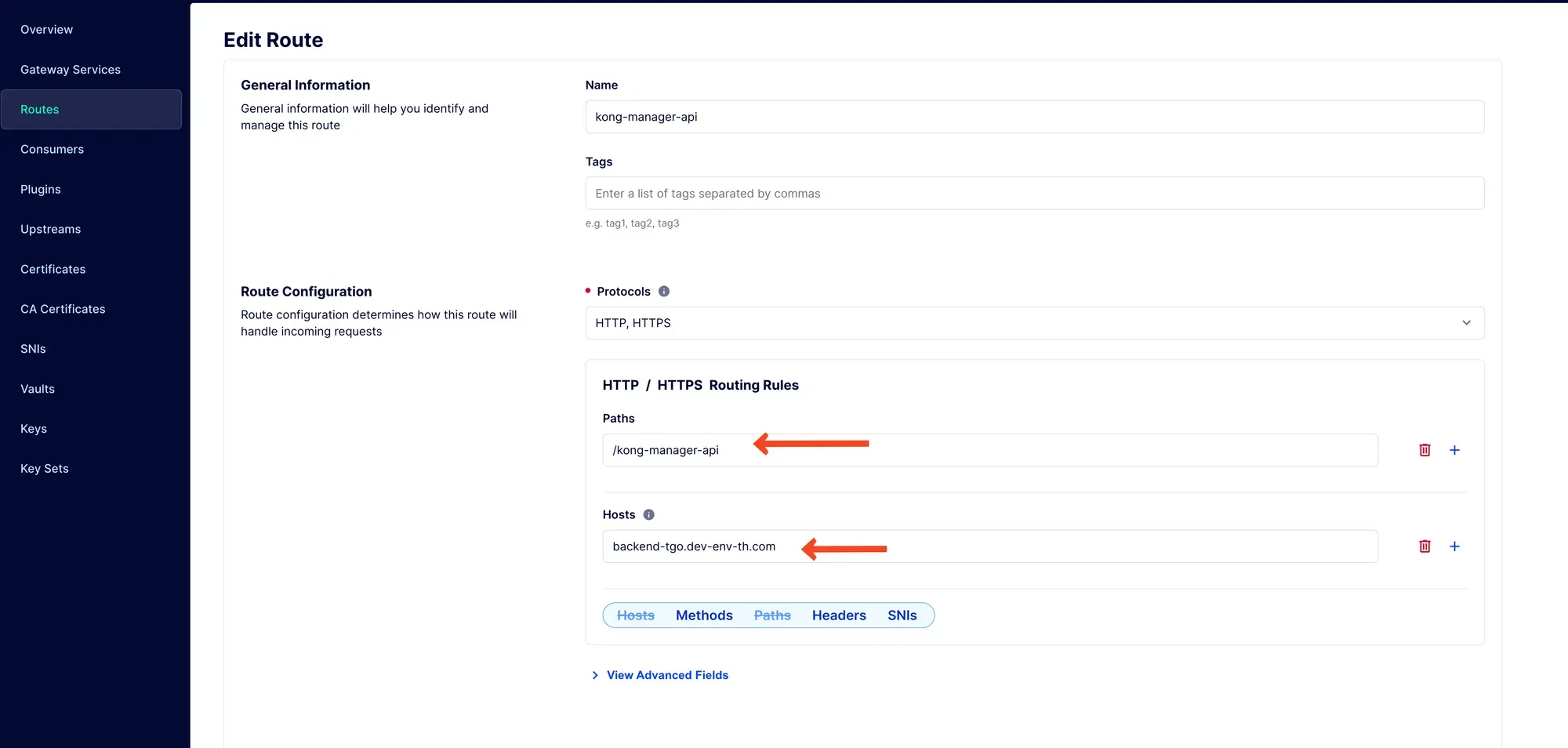
ใช้ path กับ domain ตามที่ตั้งใจไว้
Setup Kong Web UI
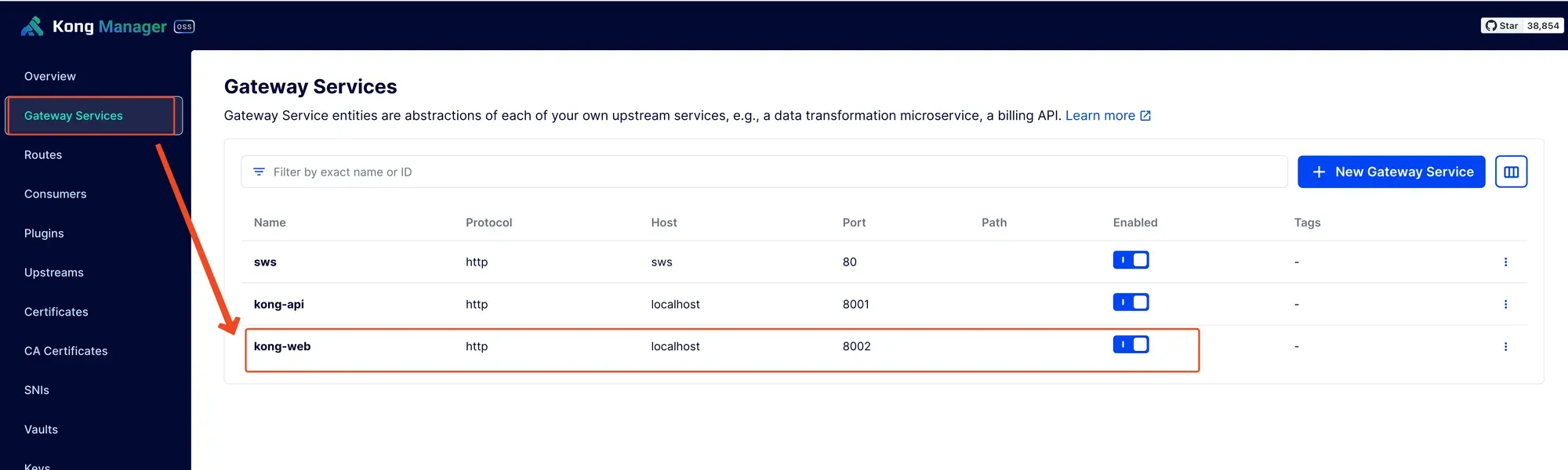
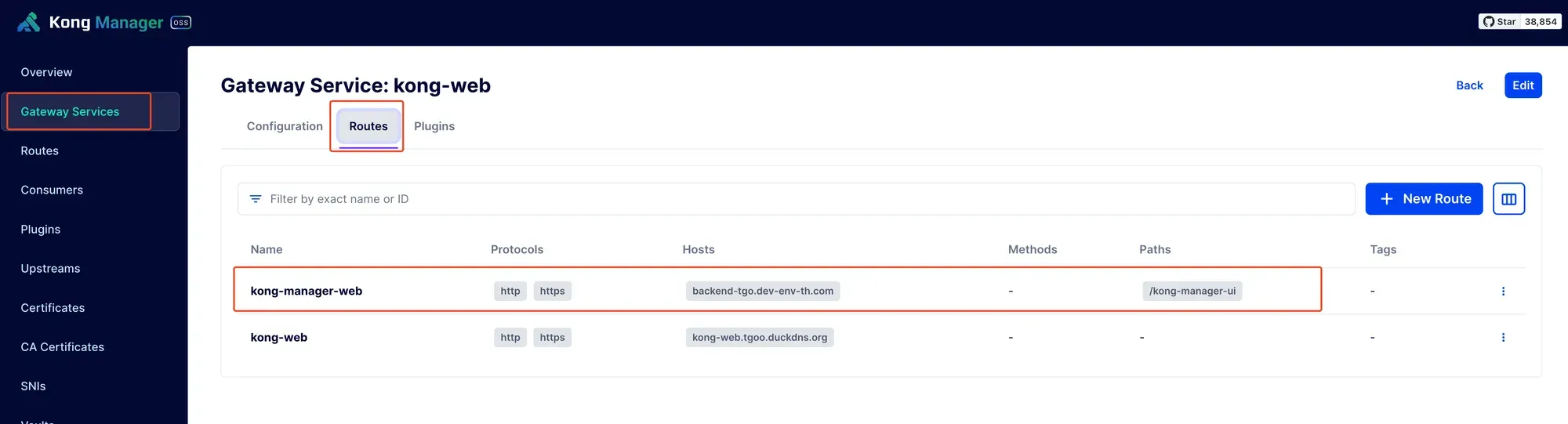
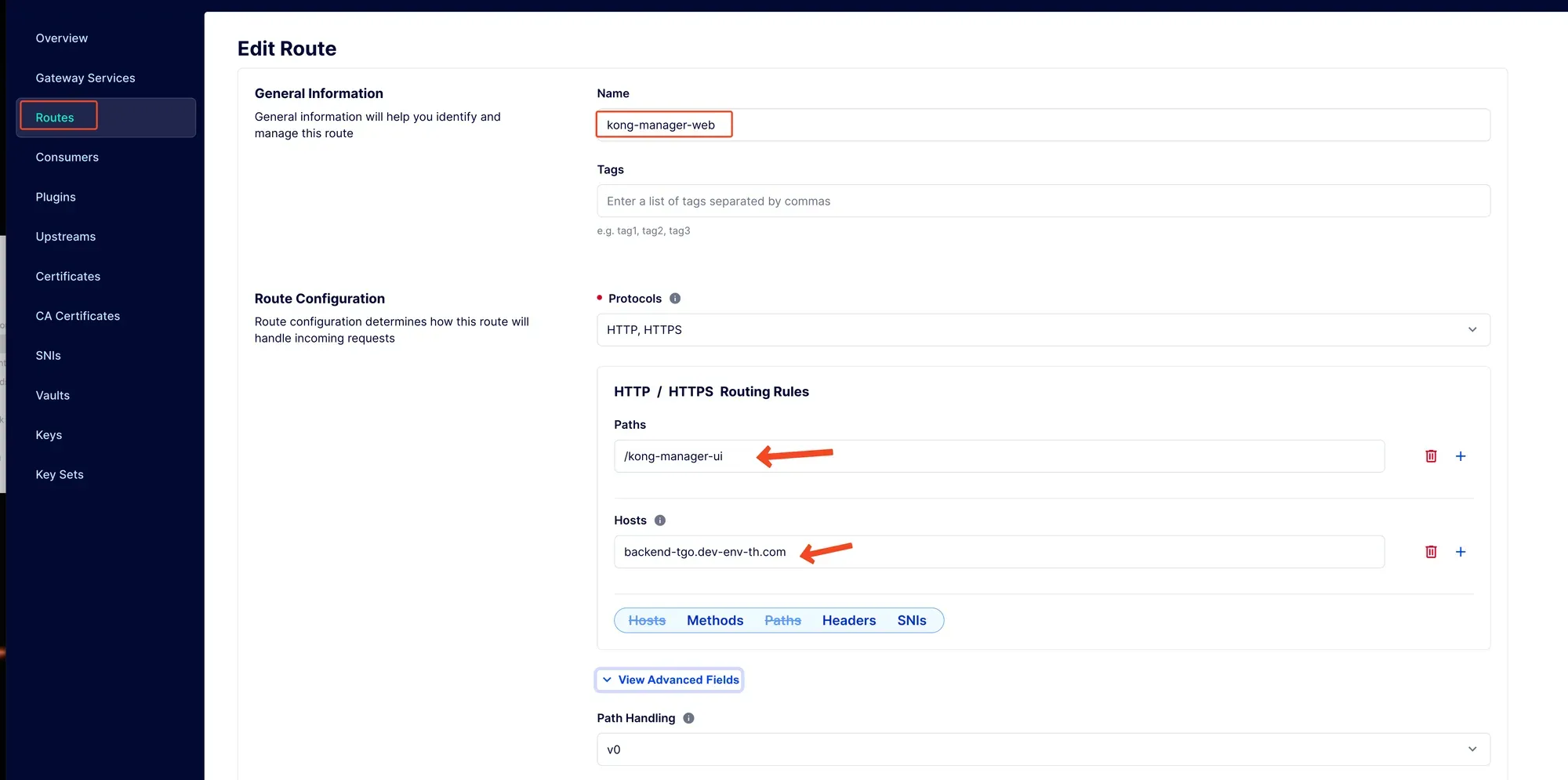
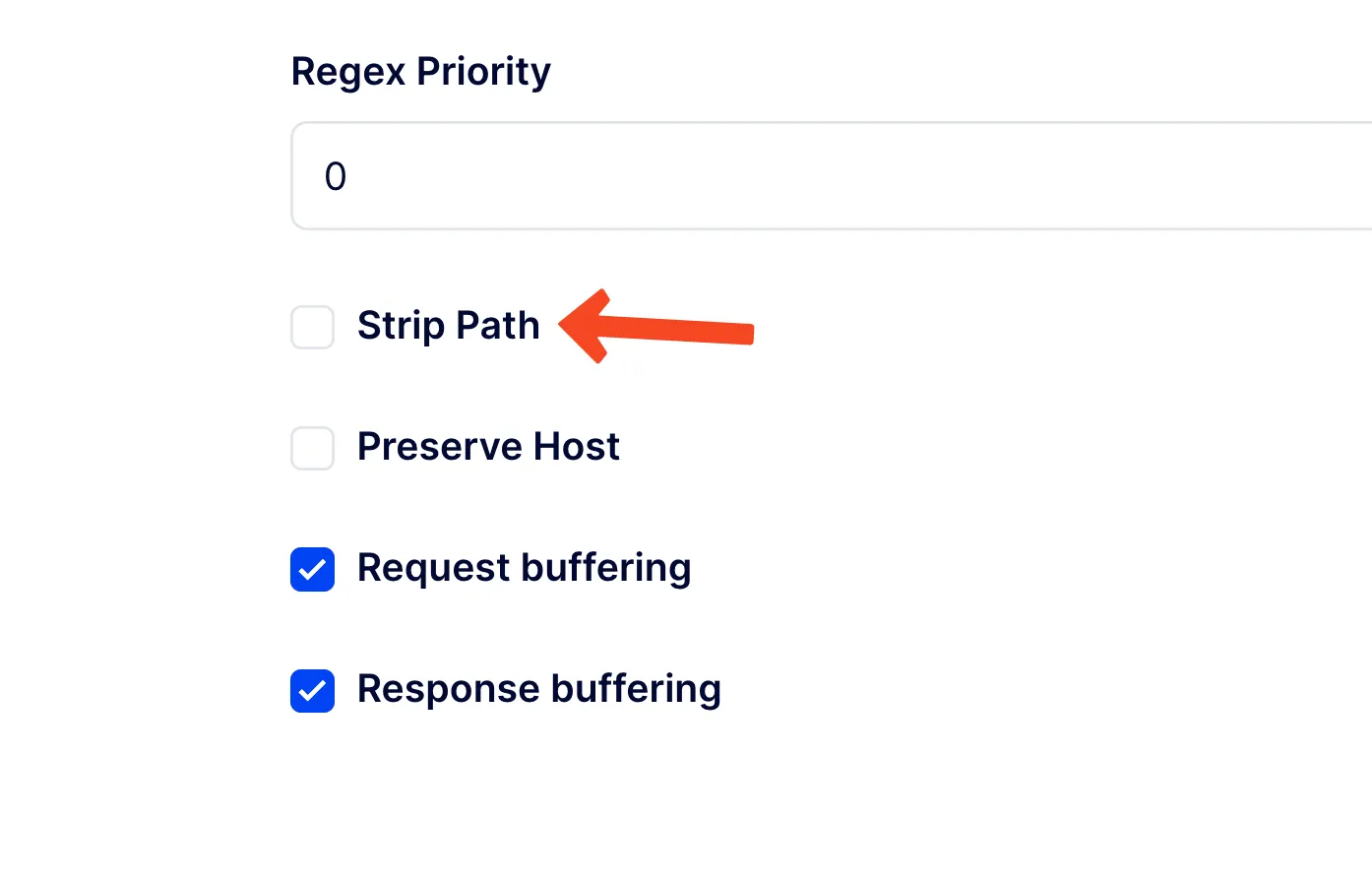
ให้เอา strip path ออกด้วยนะ เดี๋ยวเราจะไประบุ path ผ่าน kong config อีกที
แก้ compose.yaml
เราจะแก้ config ใน kong โดยเพิ่ม ENV ตามนี้
KONG_ADMIN_GUI_URL: "https://backend-tgo.dev-env-th.com/kong-manager-ui"KONG_ADMIN_GUI_API_URL: "https://backend-tgo.dev-env-th.com/kong-manager-api"KONG_ADMIN_GUI_PATH: "/kong-manager-ui"
version: "3.9"
x-kong-config: &kong-env  KONG_DATABASE: ${KONG_DATABASE:-off}  KONG_PG_DATABASE: ${KONG_PG_DATABASE:-kong}  KONG_PG_HOST: db  KONG_PG_USER: ${KONG_PG_USER:-kong}  KONG_PG_PASSWORD_FILE: /run/secrets/kong_postgres_password
volumes:  kong_data: {}  kong_prefix_vol:    driver_opts:      type: tmpfs      device: tmpfs  kong_tmp_vol:    driver_opts:      type: tmpfs      device: tmpfs
networks:  kong-net:    external: true
services:  kong-migrations:    image: "${KONG_DOCKER_TAG:-kong:latest}"    command: kong migrations bootstrap    profiles: ["database"]    depends_on:      - db    environment:      <<: *kong-env    secrets:      - kong_postgres_password    networks:      - kong-net    restart: on-failure
  kong-migrations-up:    image: "${KONG_DOCKER_TAG:-kong:latest}"    command: kong migrations up && kong migrations finish    profiles: ["database"]    depends_on:      - db    environment:      <<: *kong-env    secrets:      - kong_postgres_password    networks:      - kong-net    restart: on-failure
  kong:    image: "${KONG_DOCKER_TAG:-kong:latest}"    user: "${KONG_USER:-kong}"    environment:      <<: *kong-env      KONG_ADMIN_ACCESS_LOG: /dev/stdout      KONG_ADMIN_ERROR_LOG: /dev/stderr      KONG_PROXY_LISTEN: "${KONG_PROXY_LISTEN:-0.0.0.0:8000}, 0.0.0.0:8443 http2 ssl"      KONG_ADMIN_LISTEN: "${KONG_ADMIN_LISTEN:-0.0.0.0:8001}, 0.0.0.0:8444"      KONG_ADMIN_GUI_LISTEN: "${KONG_ADMIN_GUI_LISTEN:-0.0.0.0:8002}, 0.0.0.0:8445"      KONG_ADMIN_GUI_URL: "https://backend-tgo.dev-env-th.com/kong-manager-ui"      KONG_ADMIN_GUI_API_URL: "https://backend-tgo.dev-env-th.com/kong-manager-api"      KONG_ADMIN_GUI_PATH: "/kong-manager-ui"      KONG_PROXY_ACCESS_LOG: /dev/stdout      KONG_PROXY_ERROR_LOG: /dev/stderr      KONG_PREFIX: ${KONG_PREFIX:-/var/run/kong}      KONG_DECLARATIVE_CONFIG: "/opt/kong/kong.yaml"
    secrets:      - kong_postgres_password    networks:      - kong-net    ports:      # The following two environment variables default to an insecure value (0.0.0.0)      # according to the CIS Security test.      - "${KONG_INBOUND_PROXY_LISTEN:-0.0.0.0}:8000:8000/tcp"      - "${KONG_INBOUND_SSL_PROXY_LISTEN:-0.0.0.0}:8443:8443/tcp"      # Making them mandatory but undefined, like so would be backwards-breaking:      # - "${KONG_INBOUND_PROXY_LISTEN?Missing inbound proxy host}:8000:8000/tcp"      # - "${KONG_INBOUND_SSL_PROXY_LISTEN?Missing inbound proxy ssl host}:8443:8443/tcp"      # Alternative is deactivating check 5.13 in the security bench, if we consider Kong's own config to be enough security here
      - "0.0.0.0:8001:8001/tcp"      - "0.0.0.0:8444:8444/tcp"      - "0.0.0.0:8002:8002/tcp"      - "0.0.0.0:8445:8445/tcp"    healthcheck:      test: ["CMD", "kong", "health"]      interval: 10s      timeout: 10s      retries: 10    restart: on-failure:5    read_only: true    volumes:      - kong_prefix_vol:${KONG_PREFIX:-/var/run/kong}      - kong_tmp_vol:/tmp      - ./config:/opt/kong    security_opt:      - no-new-privileges
  db:    image: postgres:9.5    profiles: ["database"]    environment:      POSTGRES_DB: ${KONG_PG_DATABASE:-kong}      POSTGRES_USER: ${KONG_PG_USER:-kong}      POSTGRES_PASSWORD_FILE: /run/secrets/kong_postgres_password    secrets:      - kong_postgres_password    healthcheck:      test:        [          "CMD",          "pg_isready",          "-d",          "${KONG_PG_DATABASE:-kong}",          "-U",          "${KONG_PG_USER:-kong}",        ]      interval: 30s      timeout: 30s      retries: 3    restart: on-failure    stdin_open: true    tty: true    networks:      - kong-net    volumes:      - kong_data:/var/lib/postgresql/data
secrets:  kong_postgres_password:    file: ./POSTGRES_PASSWORD
เสร็จเรียบร้อย